
If you are building a website for your business, start at step 1 with SEO in mind. Do it the other way around and you spend hours later going back through the site fixing things to match SEO standards. And SEO is not as simple as finding a few keywords and throwing them in. Keywords are one piece of it, and that piece goes deeper than most people expect. Here is where to start on how to develop a website for SEO.
Indexing
Search engines need to be able to “crawl” or navigate your page in order to examine your content and index the page. Indexing basically means that it is being added to the search engine’s database. When putting together content on your page, it is important that you do this in HTML format. Most other formats are ignored or not easily crawled by search engines. Formats to stay away from:
Flash files
Java Applets
Other non-text content
If you are wondering what to do with pictures and other non-text items, here are a few suggestions :
Provide alt-text for images to give a description of what it is
Get rid of search boxes and replace them with navigation and crawlable links
Supplement Flash or Java plug-ins with text
Utilize a transcript for video and audio content
URL Link Structures
Look at the URL address bar on the top of your page. What does the link look like? Odds are if it has an optimized link structure it will include some keywords from this very page. It is very important that all of your URLs indicate what the reader will be able to find on the linked page. Some websites may just auto-populate a URL with numbers and letters that don’t mean anything, and this is no good for SEO.
**Tip:**When you have a URL that will include more than 1 word, it is important to use dashes to separate them.
Example of a bad URL structure:
https://growwithhype.com/098123jah83nas87#idkwhatshappening/2321 (This is not a real link, don't click it)
Example of a good URL structure:
https://growwithhype.com/what-is-a-responsive-web-design-and-do-i-need-it/
Navigation
Customers and search engines both need to reach every part of your website without hunting for it. Put an easy-to-find navigation panel at the top of the page, since that is statistically the easiest place to find and see it. Then visitors and search engine crawlers can get to every relevant page, and to the information and services they came for.
Responsiveness
This means a lot of things on your website. Such as:
Website speed, Visitors will not hang out on your website for very long if it takes them a long time to load a page, image or anything for that matter. Instant gratification is a real thing these days. Make your website fast. You can use Google PageSpeed Insights, a free tool that will dissect the speed of your website, tell you what's good and bad about it, as well as suggestions on how to fix the problems.
Functional links, Routinely keep up with the links on your website. If a webpage you link to breaks and you are just leading customers to an error page, this does not bode well for your SEO rankings. You can use a free Chrome extension called: Check My Links to comb each page on your site and it will highlight the functional ones in green while alerting you to broken links in red!
Mobile functionality, More and more people are using phones, tablets and other mobile devices for their internet searches. Make sure you keep up with the times and optimize your website for mobile. You will be penalized if this does not happen. Get ahead of the game with Googles free mobile optimization tool, it will check your website and see if it is properly optimized for mobile!
Keywords
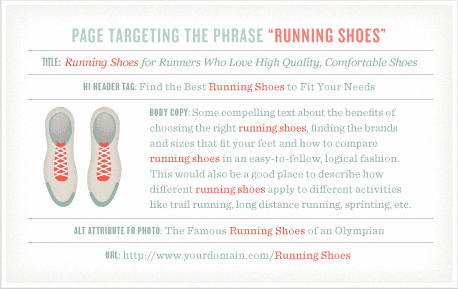
I may have made a joke about keywords earlier, but they are in fact, very important when learning how to develop a website for SEO. Search engines live and die by keywords, and they will group all web pages up with keywords when they index. Researching and implementing keywords into all of the necessary parts of your website is a very intricate process that requires a lot of effort. Here is a helpful infographic that Moz put together as a suggestion for where to put keywords when you are trying to optimize copy and get the search engines to notice:
Wrap Up
Developing a website for SEO takes more work than one post can cover. The tips above are the starting layer, and the deeper fixes are the ones that actually move rankings. If you want help with any of it, bring your SEO questions to Hype Digital Marketing. We are a full-service agency and we handle a range of work for business owners, SEO most of all.
Want to learn more about SEO, web design, PPC, content development and more? Join our newsletter below for all of the juicy info!